

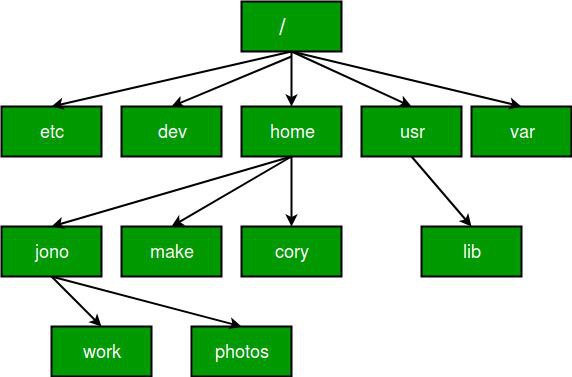
In Linux, a path specifies the location of a file or directory in the file system. The key difference between absolute paths and relative paths is the starting point: an absolute path starts from the root of the file system, while a relative path starts from the current working directory.
Let’s dive in. In Linux,
Absolute Path:
- Full path from the root directory (/)
- Starts with / (e.g., /home/user/documents/file.txt)
- Unique location, no matter where you are.
Examples:
/etc/hosts (system hosts file)
/var/log/syslog (log file location)
/home/user/project/main.py (Python script)
Why use?
- Precision: always points to the same place
- No confusion, regardless of current directory
Relative Path:
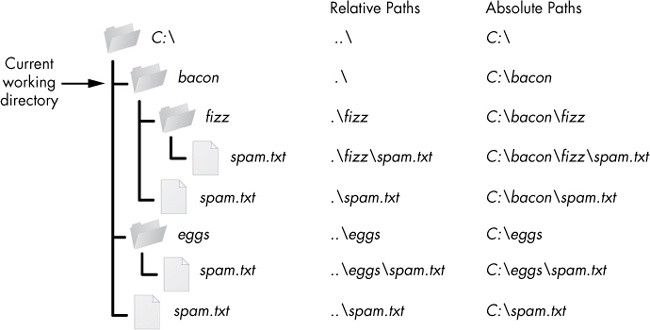
- Path relative to your current working directory
- Doesn’t start with / (e.g., documents/file.txt if you’re in /home/user)
- Shorter, but depends on your location
Examples:
./script.sh (run script in current dir)
docs/file.txt (file in docs subdir)
../backup/data.zip (file in parent’s backup dir)
Why use?
- Shorter, flexible
- Great for scripts you move around
- Everyday navigation is easier
Let’s dive into our lab test.
Assignment: Prerequisite: The Concept
- Absolute Path: The “Full Address.” Always starts from the root directory (/). It works no matter where you currently are in the system.
- Example: /home/user/documents/file.txt
- Relative Path: Directions from “Where You Are.” Never starts with a slash. It depends on your current location.
- Symbols: . (here), .. (up one level), ~ (home).
Part 1: The Setup (Do this first)
Open your terminal. Run these commands to create a safe “playground” directory structure for this assignment. This prevents you from messing up your actual files. You will see -p which we have not discussed before
The -p flag stands for “parents”.
Here is why it is critical in that specific command:
- Without -p: If you ran mkdir ~/assignment/music/rock, Linux would try to create the final folder However, if the folders assignment or music didn’t exist yet, the command would fail with an error like: mkdir: cannot create directory ‘rock’: No such file or directory
- With -p: It tells Linux: “Please create the final directory rock, and also create any missing parent directories (assignment and music) along the way.”
- mkdir -p ~/assignment/music/rock
- mkdir -p ~/assignment/music/jazz
- mkdir -p ~/assignment/photos/2023
- mkdir -p ~/assignment/photos/2024
- touch ~/assignment/music/rock/song1.mp3
- touch ~/assignment/photos/2023/photo1.jpg
Part 2: The Assignment Tasks
Task 1: Absolute Navigation
- No matter where you are right now, write the command to change directory (cd) into the rock folder using the Absolute Path.
- List (ls) the contents of the /var/log directory using the Absolute Path (do not move into that directory, just list it).
Task 2: Relative Navigation
Assume you are currently inside the ~/assignment/music/rock directory for these questions.
- Move up one level to the music directory using a Relative Path.
- Move straight to the jazz directory (which is a sibling of rock) using a Relative Path.
- Move all the way to ~/assignment/photos/2023 using a Relative Path.
Task 3: File Operations
Assume you are currently inside ~/assignment (the root of our playground).
- Copy (cp) the file photo1. jpg (which is inside photos/2023) into your current directory using a Relative Path for the source.
- Remove (rm) the filemp3 using the Absolute Path.
Now let’s dive in.
Part 1 (Setup)

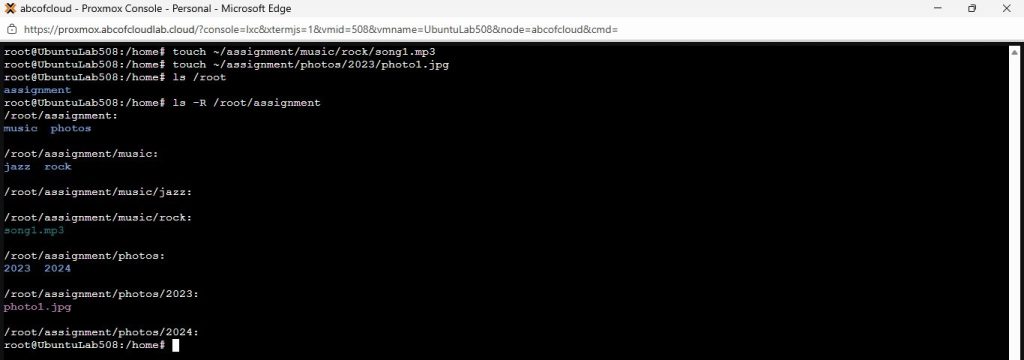
Part 2
Task 1. Absolute Navigation
- Change directory (cd) into the rock folder using Absolute path.

- List (ls) the contents of the /var/log directory using Absolute Path. (Do not move into that directory, just list it).

Task 2 Relative Navigation
Assume you are currently inside the ̴/assignment/music/rock directory

- Move straight to jazz directory (which is sibling of rock) using a Relative Path.

- Move all the way to ̴/assignment/photos/2023 using Relative Path
Task 3 File Operations
Assume you are currently inside ̴/assignment (the root of our playground).
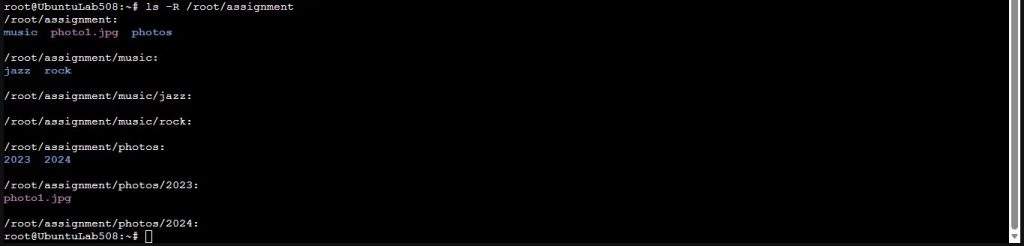
- Copy (cp) the file photo1.jpg (which is inside photos/2023) into your current directory using a Relative Path for the source.

- Remove (rm) the file song1.mp3 using Absolute Path.

Linux does not hide problems. It exposes them. Once you understand that, Linux stops being intimidating and starts being predictable. Start today.
Linux Paths: Absolute & Relative