

The Linux Ledger: Back to the Source
Demystifying the world’s most powerful open-source engine—from the ground up.
1. What exactly is Linux?
Most people think of Linux as a single operating system like Windows or macOS. In reality, Linux is just the “Kernel”—the core software that acts as a bridge between your computer’s hardware (CPU, RAM, Disk) and the apps you run (Browser, Spotify, Terminal).
When you use “Linux” on a laptop, you’re actually using a Distribution (or “Distro”). A distro takes the Linux Kernel and wraps it in a user-friendly package with a desktop interface, a file manager, and pre-installed tools.
The “Big Three” for Beginners:
- Ubuntu: The most popular “standard” choice. Huge community support and very stable.
- Linux Mint: Perfect if you’re coming from Windows; it feels familiar and “just works.”
- Fedora: For those who want the latest features and a clean, modern experience.
2. The Layered Architecture
To understand Linux, imagine an onion. Each layer relies on the one beneath it:
- Layer 1: The Hardware – Your physical machine (the “metal”).
- Layer 2: The Kernel – The brain. It decides which app gets to use the CPU and how memory is allocated.
- Layer 3: The Shell – This is the interpreter. It takes your commands and tells the Kernel what to do.
- Layer 4: The Desktop Environment (GUI) – The visual part you click on (icons, taskbars, windows).
- Layer 5: Applications – Your browser, code editors, and media players.
3. The “Superpower” Terminal
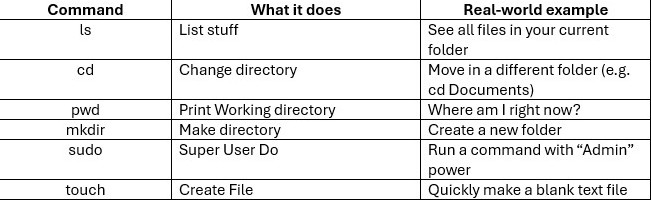
While you can do almost everything in Linux using a mouse, the Terminal (CLI) is where the real magic happens. It’s faster, more precise, and allows for automation.
The “First Day” Command List:
4. Why bother switching in 2026?
If Windows works, why switch? Here is the “Basics” argument for Linux:
- Total Ownership: Unlike Windows, Linux doesn’t force updates or show ads in your Start menu. You own the OS; it doesn’t own you.
- Privacy: Most distros don’t collect “telemetry” (data about what you do).
- Performance: Linux is incredibly lightweight. It can make a 10-year-old laptop feel brand new again.
- Learning: If you want a career in tech, Linux is the language of the cloud. Every major server in the world runs on it.
Closing Thought: The “Windows Way” vs. The “Linux Way”
On Windows, you go to a website, download an .exe file, and click “Next” five times. On Linux, you use a Package Manager (like a built-in App Store). It’s safer, faster, and keeps all your apps updated in one click.
The Linux Ledger: The Power of Permissions & Privacy
Mastering the rules of the system and why Linux is the ultimate digital fortress.
1. The “Root” of the Matter: Who is the Boss?
In the world of Linux, not all users are created equal. This is the foundation of why Linux is so much more secure than traditional operating systems.
- The Standard User: This is you. You can create documents, browse the web, and change your wallpaper. But you cannot touch the “vital organs” of the system.
- The Root User (The Superuser): This is the “God Mode” account. The Root user can delete anything, move anything, and change any setting.
- sudo (SuperUser DO): This is your most important tool. It’s like a temporary badge that lets a standard user perform a “Root” task safely. When you type sudo, the system asks for your password to make sure you really meant to do that.
2. Decoding the Secret Language: Permissions
Every single file and folder in Linux has a “lock” on it. If you look at a file’s properties in the terminal, you’ll see a strange string like -rwxr-xr–.
Don’t let it intimidate you! It’s just a code for three groups:
- Owner: The person who created the file.
- Group: A collection of users (like a “Marketing” or “IT” team).
- Others: Everyone else on the system.
The Three Actions:
- R (Read): Can you see what’s inside?
- W (Write): Can you change it or delete it?
- X (Execute): Can you “run” it (like a program or script)?
Example: If a file is “Read Only” for Others, they can see your document, but they can’t edit a single word. This keeps your data safe from prying eyes—or accidental deletions.
3. The File System: Everything is a File
This is the “Golden Rule” of Linux. Whether it’s your keyboard, your hard drive, or a simple text document, Linux treats them all as files.
Unlike Windows, which uses letters like C: or D: Linux uses a Tree Structure:
- / (The Root): The very bottom of the tree. Everything grows from here.
- /home: Where your personal stuff lives (Documents, Pictures, Videos).
- /etc: Where the system stores its configuration “blueprints.”
- /bin: Where the “binary” programs (like ls or cd) live.
4. Why it Matters for Your Privacy
In 2026, data is more valuable than oil. Most operating systems “call home” to tell big companies what you are doing. Linux is different.
- No Spying: Because the code is “Open Source,” thousands of people check it to ensure there are no hidden “backdoors” or tracking software.
- Custom Privacy: You can choose a distribution (like Tails or Qubes) specifically designed to make you invisible online.
- Encryption by Default: Most modern Linux installers offer to “scramble” your entire hard drive. If someone steals your laptop, they can’t see a single byte of your data without your master key.
Final Thought: Freedom to Break (and Fix) Things
The best part about the basics of Linux is that it encourages curiosity. In other systems, you are a tenant. In Linux, you are the landlord. You have the keys to every room, the right to paint the walls any color, and the power to rebuild the foundation.
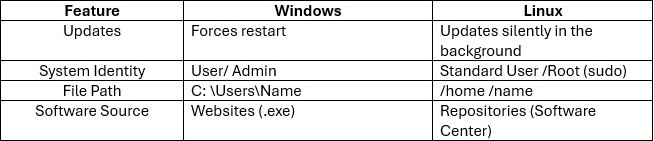
Quick Table: Windows vs. Linux Basics
How comfortable do you feel with the idea of using the “Terminal” for your daily tasks?